Hollows Academy Devlog[1]
Inventory System
Welcome to the second devlog for Hollows Academy! In this devlog, I will talk about how I developed the inventory system, with the system including managing items, weapons and party members, while also managing player stats and current status, as well as a quests menu.
Overview
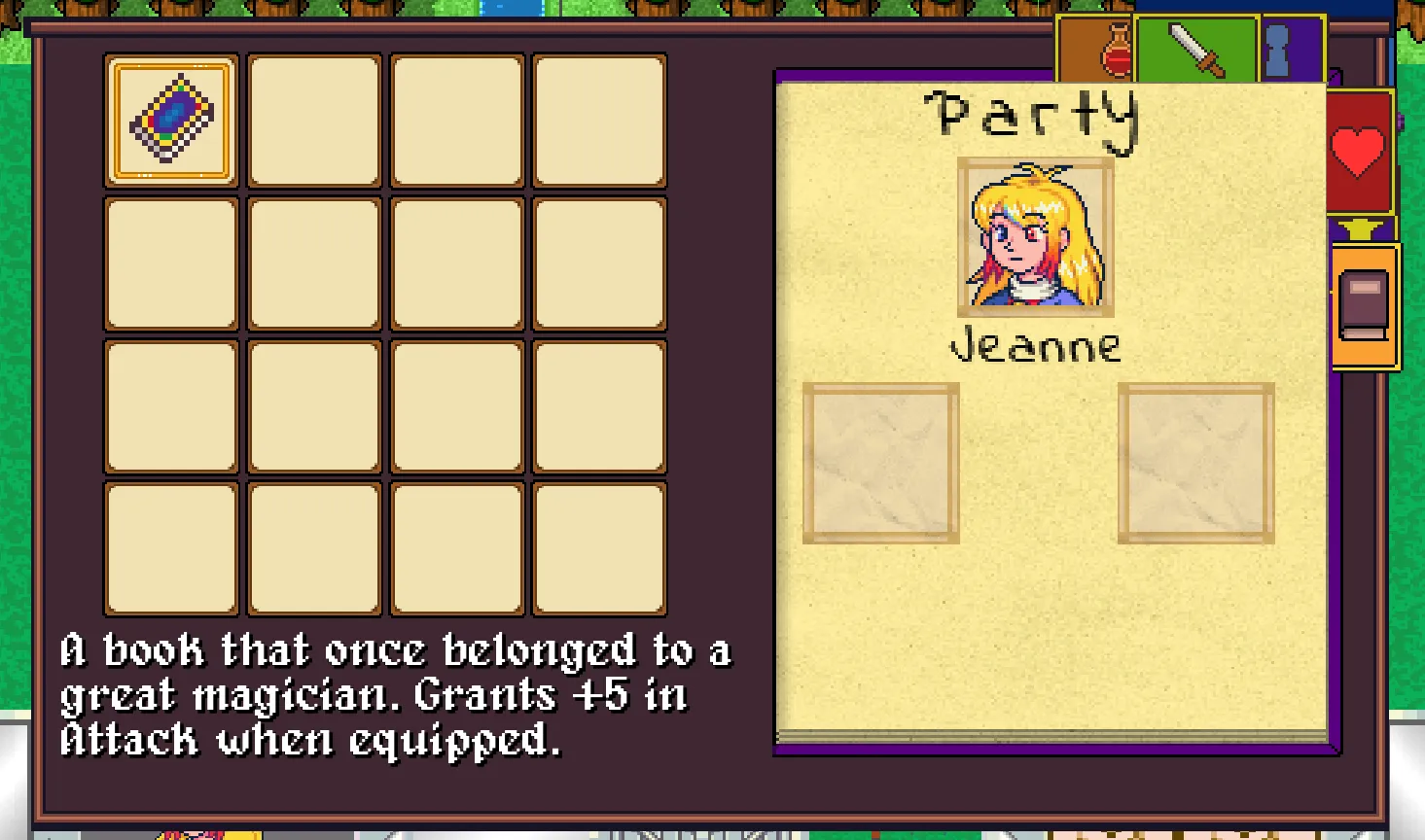
The new inventory features abilities to manage and use items, assign and unassign weapons and player party management. It also has a stats menu, status menu and a quests menu, which allow the players to see them and their party's stats and current status, as well as viewing all the main and side quests the player has.
Part 0 - The Initial Ideas
When I first started planning the inventory system, I knew I wanted it to be more than just a list of items. Since the game features recruitable party members, equipment, and eventually more RPG mechanics, the inventory needed to act as a central hub for managing the player's entire team. My goal was to create something that felt simple to navigate while still being flexible enough to support future systems without requiring major redesigns later. The initial concept revolved around three core sections: Items, Weapons, and Party Members. From there, I began thinking about how these systems would interact with each other. Using a healing item should allow the player to choose who receives it, equipping a weapon should update character stats and visuals, and recruited characters should be assignable to the active party directly from the menu. With those goals in mind, I started building the underlying framework that would eventually connect all of these systems together.
Part 1 - Multi-Tab Inventory Architecture
One of the major goals for the inventory redesign was making it a central hub for both party management and player information. To accomplish this, I divided the interface into two separate groups of tabs, each serving a different purpose. Along the top of the inventory are the management tabs: Items, Weapons, and Party Members. These are the sections where the player actively interacts with the game world. Items can be used on party members, weapons can be equipped and unequipped, and recruited characters can be assigned to or removed from the active party. These tabs focus on making decisions and managing the player's resources. On the right side of the inventory are the information tabs: Stats, Status, and Quests. Rather than changing the player's equipment or party composition, these sections provide information about the current state of the game. The Stats tab displays character attributes such as Attack and Defense, the Status tab provides an overview of each party member's current HP and MP, and the Quests tab tracks both main story objectives and optional side quests. By separating management functions from information displays, the inventory remains organized and easy to navigate while still serving as a central location for everything related to the player's party and progression.
Part 2 - Party-Based Item Usage
One of the systems I wanted to improve was how consumable items are used. Rather than having healing items immediately affect the player when selected, I wanted items to work within the context of the entire party. This led to the creation of a dedicated party member selection menu that appears whenever the player chooses to use an item. When an item is selected, the inventory opens an action menu that allows the player to choose what they want to do with the item. If the player selects "Use", the inventory transitions into a party member selection mode and displays the currently active party.
                else if (selectedActionText == "Use")
                {
                    actionsMenu.Visible = false;

                    stats.UpdateItemDescription(
                        new inventoryItem
                        {
                            description = "Select a party member to use the item on."
                        });

                    UpdatePartyMemberSlots();
                    partyMemberSelectionMenu.Visible = true;
                    partySelectionCursor.Visible = true;
                    isSelectingPartyMember = true;
                }
                case "Red Potion":

                    if (selectedCharacter is Player player)
                    {
                        player.life += 10;

                        if (player.life > player.maxLife)
                            player.life = player.maxLife;

                        dialogueText =
                            $"{player.name} used a {selectedItem.name}! " +
                            $"{player.name} recovered 10 HP!";
                    }

                    break;
                selectedItem.amount--;

                if (selectedItem.amount <= 0)
                {
                    playerInventory.items[selectedSlotIndex] = null;
                }
Part 3 - Weapon Ownership Tracking
As I started implementing equipment management, I ran into a problem that most RPGs have to solve at some point: preventing the same weapon from being equipped by multiple characters at the same time. Since all weapons exist within a shared inventory, it would have been possible for multiple party members to reference the same weapon object, creating situations where a single sword could effectively be duplicated across the party. To prevent this, I built a weapon ownership system that automatically checks who currently has a weapon equipped before assigning it to a new character. Whenever the player chooses to equip a weapon, the inventory first searches the player and every active party member to see if that weapon is already in use.
                private void ReassignWeapon(Entity newOwner, inventoryItem weaponToEquip)
                {
                    if (weaponToEquip == null)
                        return;

                    CheckAndUnequipWeaponFromPartyOrPlayer(
                        weaponToEquip,
                        newOwner
                    );

                    if (newOwner.currentWeapon != null &&
                        newOwner.currentWeapon.name != weaponToEquip.name)
                    {
                        UnequipWeapon(newOwner);
                    }
                }
                if (playerEntity != null &&
                    playerEntity.currentWeapon != null &&
                    playerEntity.currentWeapon.name == weapon.name &&
                    playerEntity != excludeEntity)
                {
                    UnequipWeapon(playerEntity);
                }

                foreach (var entity in player.currentParty)
                {
                    if (entity != null &&
                        entity != excludeEntity &&
                        entity.currentWeapon != null &&
                        entity.currentWeapon.name == weapon.name)
                    {
                        UnequipWeapon(entity);
                        break;
                    }
                }
                entityCharacter.currentWeapon = weaponToEquip;
                entityCharacter.attack = entityCharacter.getAttack();

                UpdateEquippedUI(
                    entityCharacter,
                    weaponToEquip
                );
Part 4 - Dynamic Equipment Indicators
As the weapon system became more complex, I realized it was becoming difficult to quickly tell who had what equipped. A player might have several weapons in their inventory, but there was no immediate way to see which character was currently using each one without manually checking every party member. To solve this, I added dynamic equipment indicators directly to the weapon inventory. Whenever the weapon inventory is updated, the system loops through every weapon slot and checks whether that weapon is currently equipped by the player or one of the active party members. Before performing these checks, the indicator icon is cleared to ensure the display always reflects the current state of the party.
                for (int i = 0; i < playerWeapons.weapons.Length; i++)
                {
                    var weapon = playerWeapons.weapons[i];

                    var icon = GetNode<NinePatchRect>(
                        $"EquippedCharacterSlot{i}"
                    );

                    if (icon == null)
                        continue;

                    icon.Texture = null;
                }
                if (owner.currentWeapon.name == weapon.name)
                {
                    string path;

                    if (owner == player)
                    {
                        path =
                        "res://Assets/Characters/Player/JeanneMapIcon.png";
                    }

                    var texture =
                        ResourceLoader.Load<Texture2D>(path);

                    if (texture != null)
                    {
                        icon.Texture = texture;
                    }
                }
                foreach (var member in player.currentParty)
                {
                    if (member == null)
                        continue;

                    SetWeaponIcon(
                        icon,
                        weapon,
                        member
                    );
                }
                private void SetWeaponIcon(
                    NinePatchRect icon,
                    inventoryItem weapon,
                    Entity owner)
                {
                    if (weapon == null ||
                        owner?.currentWeapon == null)
                    {
                        return;
                    }

                    if (owner.currentWeapon.name == weapon.name)
                    {
                        icon.Texture = texture;
                    }
                }
Part 5 - Party Assignment System
As recruitable characters started being added to the game, I needed a way for players to manage who was actually traveling with them. Simply recruiting a character wasn't enough, since not every recruited character should automatically join the active party. To solve this, I implemented a party assignment system that separates the roster of recruited characters from the smaller group of characters currently accompanying the player. When viewing the Party tab, players can select a recruited character and choose whether to assign or unassign them from the active party. The inventory dynamically generates these actions through the same context-sensitive menu system used elsewhere in the inventory.
                menuActions = (isItemSelected, isPartyMemberMenu) switch
                {
                    (true, _) => new string[] { "Use", "Close" },
                    (false, true) => new string[] { "Assign", "Unassign" },
                    (false, false) => new string[] { "Equip", "Unequip" }
                };
                else if (!isUnassigningPartyMember &&
                         player.currentParty[i] == null)
                {
                    player.currentParty[i] = selectedMember;

                    selectedMember.isFollowingPlayer = true;

                    GD.Print(
                        $"{selectedMember.Name} assigned."
                    );

                    actionDone = true;
                    break;
                }
                if (isUnassigningPartyMember &&
                    player.currentParty[i] == selectedMember)
                {
                    player.currentParty[i] = null;

                    selectedMember.isFollowingPlayer = false;

                    GD.Print(
                        $"{selectedMember.Name} unassigned."
                    );

                    actionDone = true;
                    break;
                }
                UpdatePartyMemberSlots();
                UpdatePartyMemberPortraits();
                UpdateNametags();
Part 6 - Dynamic Portrait and Name Updates
As more party management features were added, keeping the inventory synchronized with the game's current state became increasingly important. Characters can be assigned and unassigned from the active party at any time, weapons can be equipped or removed, and the player may be constantly changing their party composition. Rather than manually updating individual UI elements whenever something changed, I wanted the inventory to automatically rebuild the relevant information whenever the party was modified. One part of this system is updating the party portraits displayed in the inventory. Whenever the active party changes, the inventory checks which party slots are occupied and updates the corresponding portrait images. Empty slots are hidden automatically, ensuring that the interface always matches the player's current party setup.
                if (player.currentParty.Length > 0 &&
                    player.currentParty[0] != null)
                {
                    partySlot1.Texture =
                        player.currentParty[0].portraitTexture;

                    partySlot1.Visible = true;
                }

                if (player.currentParty.Length > 1 &&
                    player.currentParty[1] != null)
                {
                    partySlot2.Texture =
                        player.currentParty[1].portraitTexture;

                    partySlot2.Visible = true;
                }
                if (player?.currentParty.Length > 0 &&
                    player.currentParty[0] != null)
                {
                    party1Nametag.Text =
                        player.currentParty[0].entityName;
                }
                else
                {
                    party1Nametag.Text = "";
                }
                foreach (var member in player.currentParty)
                {
                    if (member == null)
                        continue;

                    SetWeaponIcon(
                        icon,
                        weapon,
                        member
                    );
                }
                UpdatePartyMemberSlots();
                UpdatePartyMemberPortraits();
                UpdateNametags();
Part 7 - Cursor Navigation Improvements
While the inventory's visual layout was important, a surprising amount of development time went into making it feel responsive and intuitive to navigate. Since the game is designed to support both keyboard and controller input, simply allowing the cursor to move between slots wasn't enough. The navigation system needed to handle multiple menu types, different layouts, and edge cases that could occur when party members or inventory slots were empty. The primary inventory uses a grid-based navigation system. Rather than treating the inventory as a simple list, the cursor moves relative to the number of columns in the grid. This allows the player to move naturally between rows and columns regardless of how many inventory slots are currently visible.
                var gridContainer =
                    GetNode<GridContainer>(
                        "NinePatchRect/GridContainer"
                    );

                int columns = gridContainer.Columns;

                if (Input.IsActionJustPressed("ui_up"))
                {
                    selectedSlotIndex =
                        Mathf.Max(
                            selectedSlotIndex - columns,
                            0
                        );
                }
                else if (Input.IsActionJustPressed("ui_down"))
                {
                    selectedSlotIndex =
                        Mathf.Min(
                            selectedSlotIndex + columns,
                            slots.Length - 1
                        );
                }
                if (selectedSlotIndex % columns > 0)
                {
                    selectedSlotIndex -= 1;
                }
                else
                {
                    selectedSlotIndex =
                        Mathf.Max(
                            selectedSlotIndex -
                            columns +
                            columns - 1,
                            0
                        );
                }
                for (int i = 0; i < numSlots; i++)
                {
                    int index =
                        (startIndex + i) % numSlots;

                    if (index == 0 ||
                        (index - 1 <
                         player.currentParty.Length &&
                         player.currentParty[index - 1] != null))
                    {
                        selectedPartyMemberIndex =
                            index;

                        break;
                    }
                }
                public void ChangeSelection(int direction)
                {
                    selectedActionIndex =
                        Mathf.Wrap(
                            selectedActionIndex + direction,
                            0,
                            menuActions.Length
                        );

                    UpdateSelection();
                }
                Vector2 newCursorPosition =
                    GetCursorPositionForCurrentSelection();

                partySelectionCursor.GlobalPosition =
                    newCursorPosition;
Part 8 - Dialogue Integration
As I continued expanding the inventory system, I wanted item usage to feel like part of the game's RPG experience rather than a simple stat change happening silently in the background. Early versions of the system would immediately apply an item's effects and return the player to the inventory, but this felt disconnected from the rest of the game's presentation. To improve this, I integrated the inventory directly with the dialogue system. When an item is used, the inventory first closes itself before creating a short dialogue conversation that describes the outcome. This allows item usage to use the same presentation layer as NPC conversations and story events, helping everything feel more cohesive.
                Close();

                switch (selectedItem.name)
                {
                    case "Red Potion":

                        dialogueText =
                            $"{player.name} used a " +
                            $"{selectedItem.name}! " +
                            $"{player.name} recovered 10 HP!";

                        break;
                }
                var line = new DialogueLine
                {
                    text = text,
                    endConversation = true
                };

                var convo =
                    new DialogueConversation
                {
                    Lines = new DialogueLine[] { line }
                };

                dialogue.StartConversation(
                    player,
                    convo
                );
                private void OnItemUseDialogueEnded()
                {
                    dialogue.ConversationEnded -=
                        OnItemUseDialogueEnded;

                    dialogue.ClearDialogue();
                }
Part 9 - State Management Cleanup
As more features were added to the inventory, one of the biggest challenges became managing which menus were currently active. The inventory now contains several layers of interaction, including inventory tabs, action menus, party selection menus, equipment management, and dialogue integration. Without some form of state tracking, it became very easy for multiple systems to respond to the same input at the same time. To solve this, I introduced a collection of state variables that track exactly what the player is currently doing. These flags determine which menus are visible, which inputs should be accepted, and which systems should temporarily ignore input until the current action is completed.
                public bool isSelectingPartyMember = false;
                public bool isActionsMenuActive = false;
                public bool isSubMenuActive = false;
                public bool isSelectingAction = false;

                private bool isDialogueActive = false;
                private bool isWaitingForInventoryReopen = false;

                private bool isUnassigningPartyMember;
                if (actionsMenu.Visible)
                {
                    HandleActionsMenuInput();
                    return;
                }

                if (partyMemberSelectionMenu.Visible)
                {
                    HandlePartyMemberSelectionInput();
                    return;
                }
                isSelectingPartyMember = false;
                isSelectingAction = false;
                isSubMenuActive = false;
                isActionsMenuActive = false;

                partyMemberSelectionMenu.Visible = false;
                actionsMenu.Visible = false;
Part 10 - Foundation For Future Features
Although a large portion of this update focused on making the current inventory system functional, a significant amount of thought also went into making sure the system could grow alongside the rest of the game. Rather than building solutions that only solve today's problems, I tried to structure the inventory around reusable systems that can support future RPG mechanics with minimal refactoring. One example of this can be seen in the way inventory categories are handled. Instead of creating separate inventory screens for items, weapons, and party members, a single inventory interface dynamically updates based on the currently selected tab. This allows entirely new inventory categories to be added later without needing to redesign the overall menu structure.
                switch (currentInventory)
                {
                    case 0:
                        UpdateItems();
                        break;

                    case 1:
                        UpdateWeapons();
                        break;

                    case 2:
                        UpdateParty();
                        break;
                }
                menuActions =
                    (isItemSelected,
                     isPartyMemberMenu) switch
                {
                    (true, _) =>
                        new string[]
                        {
                            "Use",
                            "Close"
                        },

                    (false, true) =>
                        new string[]
                        {
                            "Assign",
                            "Unassign"
                        },

                    (false, false) =>
                        new string[]
                        {
                            "Equip",
                            "Unequip"
                        }
                };
                selectedCharacter =
                    GetCurrentlySelectedPartyMember();

                if (selectedCharacter != null)
                {
                    // Apply item effects
                }
                entityCharacter.currentWeapon =
                    weaponToEquip;

                entityCharacter.attack =
                    entityCharacter.getAttack();
                player.currentParty[i] =
                    selectedMember;

                selectedMember
                    .isFollowingPlayer = true;
Part 11 - Closing Thoughts
This inventory update ended up becoming much larger than I originally anticipated. What started as a simple item menu gradually evolved into a complete party management system, complete with equipment handling, recruitable party members, contextual action menus, dialogue integration, and dynamic UI updates. A lot of the work wasn't necessarily visible on the surface, but instead focused on building the underlying systems needed to support a more traditional RPG experience. While there's still plenty left to add, I'm happy with where the inventory system stands right now. More importantly, the architecture is now flexible enough to support future features without constantly fighting against the codebase. As development continues, I'll be expanding on these foundations with new equipment types, additional consumables, deeper party customization, and more advanced character progression systems. For now, though, it's exciting to finally have an inventory system that feels like a core part of the game rather than just a utility menu. Adieu!